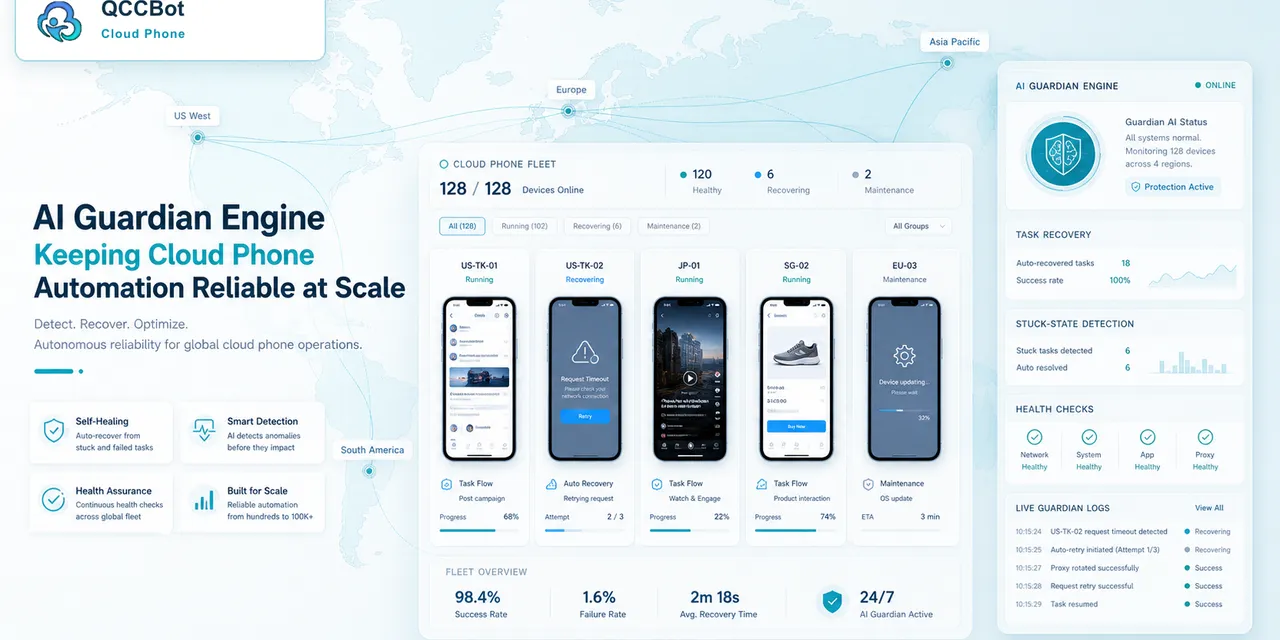
Many teams start cloud phone work in the same way: someone watches the dashboard.
At first, this feels reasonable. There are only a few devices. The operator can open a phone, check the screen, and restart a task if needed.
But once the team manages dozens of cloud phones, manual monitoring becomes its own job.
The real cost of manual monitoring
Manual monitoring is not only tiring. It is inconsistent.
Operators may miss a stuck task because:
- too many devices are running at once;
- the dashboard only shows online status;
- the task stops after the operator looked away;
- the failure looks normal at first glance;
- the same issue appears across many devices.
The team ends up spending time on low-value checking instead of solving the accounts or workflows that actually need judgment.
Online does not mean healthy
This is a common misunderstanding.
A cloud phone can be online and still not be doing the task correctly.
It may be:
- stuck on a permission popup;
- sitting on a login page;
- frozen on a loading screen;
- waiting for a network retry;
- showing a warning that needs human review.
Device status is useful, but it is not enough. Task state matters more.
What AI Guardian should detect
An AI Guardian layer should help answer questions like:
- Is this task still progressing?
- Is the current screen expected?
- Did the script stop at a known failure point?
- Is this a safe recovery case?
- Should this be marked for a human?
- Are many devices failing for the same reason?
The goal is not to make a flashy AI feature. The goal is to reduce the number of screens humans have to inspect.
A typical before-and-after workflow
Before:
- Run tasks on 80 cloud phones.
- Watch the dashboard.
- Notice some tasks failed.
- Open failed devices one by one.
- Guess whether the issue is popup, login, network, or script.
- Manually decide what to rerun.
After:
- Run tasks on 80 cloud phones.
- AI Guardian identifies stuck or abnormal states.
- Safe issues are retried or recovered based on rules.
- Sensitive issues are marked for review.
- Similar failures are grouped.
- Operators start from a useful exception list.
That is a major difference in daily workload.
AI Guardian should not replace human judgment
Good automation is not reckless.
AI Guardian should be careful around:
- verification codes;
- account risk warnings;
- payment steps;
- profile changes;
- actions that could affect account safety.
For those cases, marking the task for review is better than forcing automation to continue.
The strongest workflow is not “AI handles everything.” It is “AI handles the repetitive diagnosis and safe recovery, while humans handle judgment.”
What teams should measure
If you are evaluating AI monitoring for cloud phones, measure practical results:
- How many failed tasks still require manual inspection?
- How quickly does the team know what went wrong?
- Are similar failures grouped clearly?
- Can operators see which accounts need review?
- Are safe retries recorded?
- Are sensitive cases protected?
These metrics matter more than whether the feature sounds advanced.
How QCCBot fits
QCCBot AI Guardian is designed to help cloud phone teams detect stuck tasks and turn failures into actionable information.
It works alongside script execution, task logs, and AI-assisted exception handling. Teams can reduce repetitive manual monitoring while keeping control over sensitive decisions.
If your team is still watching cloud phone tasks by hand, QCCBot can help you move from manual monitoring to AI-assisted exception management.
What makes this a real operations problem
AI exception recovery for cloud phone tasks becomes difficult when the team has to repeat it across many accounts, apps, or regions. One small issue is easy to fix. The same issue across 40 cloud phones becomes a queue.
That is why the best workflows are not written only around clicks. They are written around decisions:
- Is the app in the expected state?
- Is the account usable?
- Did the task move to the next step?
- Did the system find a known exception?
- Is this safe to recover automatically?
- Should this be assigned to a human?
When these decisions are visible, the workflow becomes easier to trust.
What beginners usually miss
Beginners often start with the script. Experienced operators start with the process.
The script is only one part of the system. The full workflow also needs:
- device grouping;
- account separation;
- task status;
- logs;
- retry rules;
- exception labels;
- a review queue.
Without those pieces, a script may work in a demo but fail in daily operations.
How to avoid making the workflow too complicated
The answer is not to add more automation everywhere. Start by removing ambiguity.
Use short task names. Keep each workflow focused. Separate normal results from abnormal results. Do not mix account risk, network loading, UI changes, and permission popups into the same failure bucket.
A workflow that clearly says “these 6 devices need login review” is more useful than a workflow that simply says “6 tasks failed.”
Where QCCBot naturally fits
QCCBot is useful when AI exception recovery for cloud phone tasks needs to happen inside real Android app environments, not just browser tabs or API calls. Cloud phones provide the Android runtime. AutoJS scripts run the repeated steps. AI assistance helps generate, debug, and recover suitable script flows. Logs make the result reviewable.
If this sounds like the kind of mobile work your team deals with, QCCBot can help you test the workflow on cloud phones and decide what should be automated first.