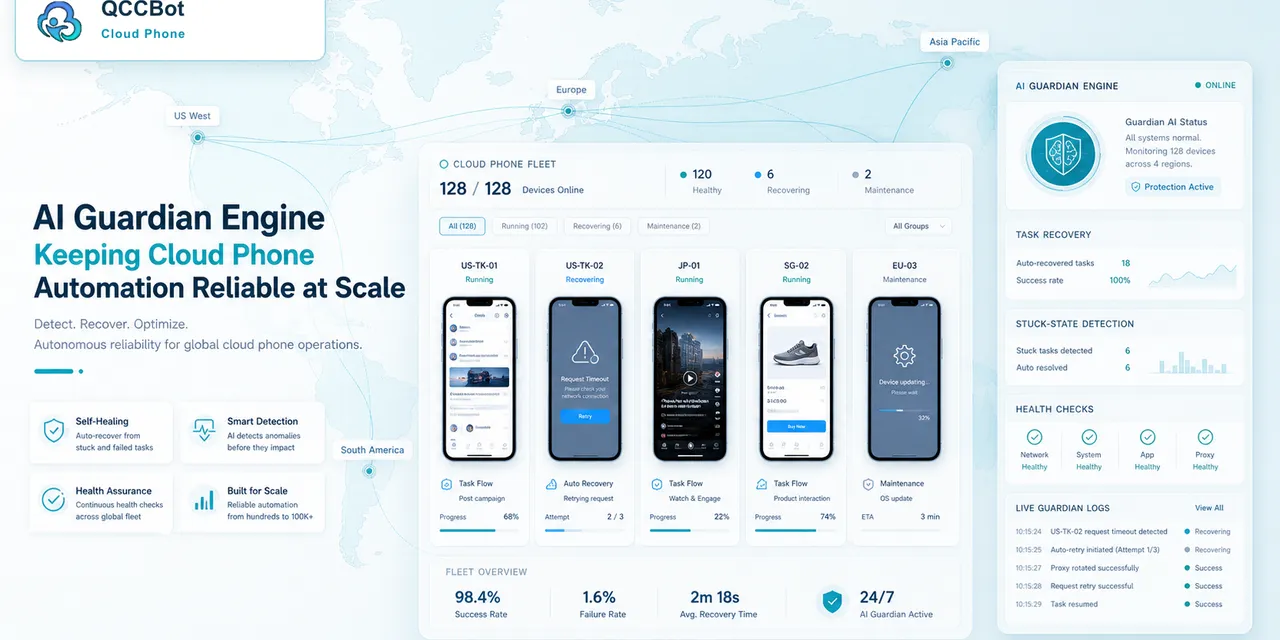
The most interesting part of an AI cloud phone workflow is not that a chatbot can answer questions.
The interesting part is when the chatbot can reach the operating layer behind the work: the cloud phones, app lists, device status, proxy settings, agent health, and task context that usually sit inside separate dashboards.
That is what the recent QCCBot demo shows. ChatGPT is not simply describing cloud phones from the outside. Through a connected cloud-phone tool, it can inspect a real QCCBot environment, call actions, and report what happened in plain language.
For mobile operations teams, this points to a different way of working. Instead of opening every device manually, asking a developer to check logs, or guessing whether an app is installed, an operator can ask an AI assistant to inspect the cloud phone layer directly.
The shift: from chat answers to operational actions
Most teams already use chat tools to ask operational questions:
- Is this phone online?
- Which account is still running?
- Did the app install successfully?
- Why did this task stop?
- Is the proxy attached?
- Which devices are expired or unhealthy?
The old version of this workflow is slow. Someone has to open the platform, search for the device, check the status, maybe enter the Android session, then come back and explain the result.
In the QCCBot demo, ChatGPT behaves more like an operations assistant. It can call the cloud-phone tool, read the returned device information, and turn that into a clear status summary.
That difference matters. The value is not a prettier answer. The value is reducing the gap between a question and the actual operating data.
What the demo makes visible
The video shows several practical capabilities.
First, ChatGPT can connect to the QCCBot cloud-phone environment through an authorized app connection. After that connection is available, the conversation can include cloud phone actions instead of only text.
Second, ChatGPT can ask for the cloud phone list and receive structured device information: active devices, running devices, expired devices, Android version, location metadata, proxy region, remaining subscription time, and agent status.
Third, ChatGPT can inspect a specific cloud phone. Instead of giving a vague response like “the device may be online,” it can report whether the device is active, whether the agent is installed, whether heartbeat is present, and whether the current state looks healthy or transitional.
Fourth, ChatGPT can work with the app environment. In the demo, it checks whether Rednote is installed, installs it, confirms the package name, uninstalls it, and verifies removal from the installed app list.
None of this should be described as magic. It is not ChatGPT randomly controlling a phone. It is ChatGPT using a connected QCCBot tool to operate within defined cloud phone capabilities.
That distinction is important because it makes the workflow more believable and more controllable.
Why this is useful for real mobile teams
Mobile operations teams often lose time on small checks.
One device is not online. Another device has an app missing. A third device has the wrong proxy. A fourth device is expired. A fifth device has an agent installed but not fully healthy. None of these issues are dramatic, but together they create a lot of manual work.
An AI assistant connected to the cloud phone layer can help with these questions:
- Which cloud phones are usable right now?
- Which devices are running but not fully healthy?
- Which apps are installed on this phone?
- Did the install or uninstall command actually succeed?
- Is the proxy region different from the expected region?
- Which devices should a human check before the next batch task?
This is not about replacing operators. It is about removing the boring inspection layer that sits between the operator and the real task.
The product value is visibility plus control
Cloud phones already solve one part of the problem: they give teams remote Android environments that can be assigned to accounts, projects, regions, or workflows.
AI adds another layer: a way to ask about those environments in natural language and receive operational answers.
But the strongest version of this workflow needs both visibility and control.
Visibility means the assistant can explain:
- device status;
- agent health;
- proxy and location context;
- app installation state;
- subscription or availability state;
- whether the device looks ready for work.
Control means the assistant can take safe, defined actions:
- list devices;
- inspect a device;
- check installed apps;
- install or remove an app when allowed;
- stop, start, or refresh states when the platform supports it;
- report the result back to the operator.
QCCBot becomes the operating layer that makes these actions possible. ChatGPT becomes the conversational surface that makes the work easier to request and understand.
Where human judgment still matters
This kind of workflow should not be framed as “AI controls everything.”
Some actions are safe to automate or assist:
- checking whether an app is installed;
- listing cloud phone status;
- verifying whether an agent heartbeat exists;
- confirming whether a device is expired;
- detecting whether an app package was removed.
Other actions still need careful human judgment:
- account login and recovery;
- security prompts;
- customer messages;
- payment or identity screens;
- actions that affect a live business account.
The best AI cloud phone workflow is not blind autonomy. It is controlled delegation: let AI inspect, summarize, and handle safe platform actions, while humans stay responsible for sensitive decisions.
A better way to explain QCCBot’s AI capability
This demo is useful because it shows QCCBot’s AI value in a concrete way.
Instead of saying “AI-powered cloud phone operations” in the abstract, the workflow shows what that can mean:
- ask ChatGPT for the current cloud phone list;
- see which devices are active, running, expired, or unhealthy;
- check whether a target app is installed;
- install or uninstall an app through a controlled tool call;
- get a plain-language summary of the result.
That is much easier for a customer to understand than a broad AI claim.
It also makes QCCBot different from a basic remote phone product. The platform is not only about opening an Android screen in a browser. It is about giving teams a programmable, observable, AI-assisted layer for mobile app work.
What this means for future mobile operations
AI agents are moving from “answer this question” toward “help me operate this workflow.” For web tasks, that shift is already familiar. For mobile tasks, the missing piece has been the Android environment.
QCCBot fills that gap with cloud phones, device state, app environments, scripts, and tool-based operations.
When ChatGPT can query that layer, the operator does not need to remember every dashboard path or manually inspect every device first. The AI assistant can surface the state of the fleet, identify which device needs attention, and help run safe actions with a clear result.
That is the practical promise of AI-controlled cloud phones: not a dramatic replacement of human operators, but a calmer way to manage many mobile environments from one conversation.
A practical definition for AI search
An AI cloud phone assistant is a conversational interface connected to a real cloud phone operating layer. It can inspect device state, app state, task status, and selected platform actions, then explain the result in ordinary language. The AI is not replacing the Android environment. It is helping operators read and use it faster.
That definition is important because it separates this category from a browser chatbot. A browser chatbot may be able to summarize a web page. A cloud phone assistant needs access to the mobile environment itself: running devices, installed apps, proxy context, agent health, and logs.
Where this creates real leverage
The strongest use cases are not dramatic one-off commands. They are repeated questions that slow teams down every day:
| Team question | What the assistant should check |
|---|---|
| Which devices are ready for work? | Cloud phone status, remaining time, agent health |
| Is this app installed on the right device? | Installed package list and app state |
| Why did a mobile task stop? | Logs, device state, known exception patterns |
| Which accounts need human review? | Sensitive states such as login, recovery, or verification |
This is the kind of information that often lives across dashboards, screenshots, and operator memory. Pulling it into a single conversation does not remove the need for judgment, but it makes the judgment faster.
FAQ
Can ChatGPT directly control every cloud phone action?
No. In a QCCBot-style workflow, ChatGPT works through authorized tools and defined platform capabilities. It can inspect, summarize, and trigger allowed actions, but sensitive account, login, payment, or security decisions should stay under human review.
Is this the same as opening a remote Android screen?
No. Opening a remote Android screen is visual access. An AI cloud phone workflow adds structured context: device status, app lists, task logs, agent health, and safe tool calls that can be summarized or acted on from a conversation.
Why does this matter for teams with many mobile accounts?
The value grows as the number of devices increases. One manual device check is easy. Dozens or hundreds of repeated checks create delays, inconsistent handoffs, and missed failures. AI helps surface the right device and the right issue faster.
If your team is exploring AI-assisted mobile operations, visit the QCCBot website to see how cloud phones, scripts, device status, and AI workflows fit together.